> LeekScript Tutorial
In a program, the most important thing is to structure your code well. So far, all you've learned for that is how to use comments, and that's about it... But we're going to change that quickly with functions, one of the most important concepts in programming, and you'll soon see why. You've already come across some, and even used them, in the Native Functions chapter.
A function is a sequence of instructions, nothing more. No more duplicated code: you just call the function, and it runs those instructions. To make functions more versatile, you can give them parameters, such as the leek you want to hit, the number of MP left for this turn, etc. A function can also return a value, such as an array of all the cells your leek can reach. Here is the prototype, i.e. the signature, of a function:
FunctionName ( parameter1, parameter2, ..., parameterN ) : Return
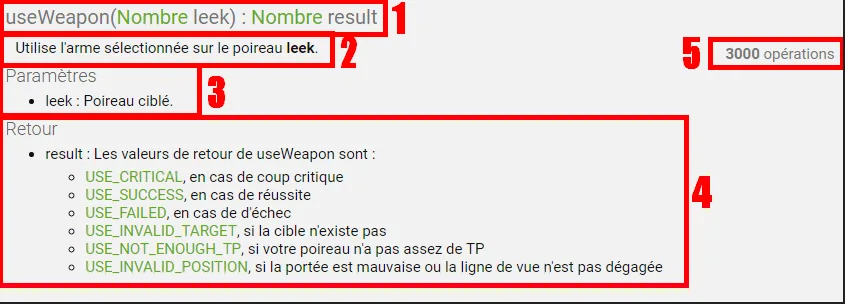
The prototype is the description of the function: its name, its return value if it has one, and its parameters, which are optional too. The definition of a function is the set of instructions it contains. The prototypes of all the native functions are available in the documentation. On the left, in the list of functions sorted by theme, if you select "UseWeapon" in the Weapons category, you'll find this: !UseWeapon-Mod
When a function is called, the 'main' program pauses to run the program stored in the function. Then, at the end of that function, the 'main' program resumes where it left off.
Functions are declared too. LeekScript gives you ready-to-use native functions such as "getNearestEnemy / useWeapon / ...", but you can also create your own. Here is the syntax to use:
function FunctionName ( parameter1, parameter2, ..., parameterN ) { /* The instructions */ }
You can't do everything inside a function: declaring a new function or a global variable is forbidden!
To make this more concrete, we'll create a very simple function: its goal will be to move toward the center of the map, then cast a shield chip and a healing chip. Here is its prototype: (Note that the prototype doesn't go in the code, except perhaps as a comment to explain your function)
ArmorAndCare()
Couldn't be simpler: our function takes no parameters and returns nothing!
It still needs a definition, though, so here it is:
function ArmorAndCare(){ moveTowardCell(306); useChip(CHIP_ARMOR, getEntity()); useChip(CHIP_CURE, getEntity()); }
To call the function, it's just like the others:
ArmorAndCare(); // Moves toward the center of the map, then casts ARMOR and CURE
Important note: a function cannot access outside variables, except global ones. Imagine that when you call the function, it "lives" in its own world, and the only things it can access are the global variables and the other functions.
To illustrate how function parameters and return values work, let's take this example:
// Prototype: getCellDistanceTo(leek) : (Number) Distance between my leek and the one passed as a parameter function getCellDistanceTo(leek){ return getCellDistance(getCell(), getCell(leek)); }
According to the prototype, the function takes a leek (its ID) as a parameter, and returns the distance between that leek and your own leek. The list of parameters is (almost) unlimited: you just separate the parameters with commas. A function returns a value with the 'return' keyword. In this example, the 'getCellDistance' function returns a number, which we return directly. When the function reaches a 'return', it stops, and the program resumes where the function was called. For those interested, the principle of reducing the number of parameters of a function is called 'currying'. If you want to stop the function early without returning a value, just write the 'return' keyword without a value.
This section only applies to LS1. From LS2 onward, arrays and objects are no longer copied when calling a function, and @ is deprecated: it no longer has any effect.
In the examples above, the data sent when calling a function is copied. Here is what happens:
function getCellDistanceTo(leek){ return getCellDistance(getCell(), getCell(leek)); }
var enemy = getNearestEnemy();
getCellDistanceTo(enemy );
// 1 - Call to getNearestEnemy, which returns a leek ID (example: 2) // 2 - enemy is now '2' // 3 - Call to getCellDistanceTo, which takes a parameter (in the example: enemy, i.e. 2) // 4 - Inside getCellDistanceTo: 'leek = 2;' runs, then the function's definition // 5 - Call to getCellDistance: copy of 'getCell()' (its return value) and of 'getCell(leek)' (its return value too) // 6 - Returns the distance between the two leeks
What does this copy mean? If we modify 'leek' inside 'getCellDistanceTo', our 'enemy' variable will not be modified.
Let's take an example that better illustrates passing by reference:
// Prototype // canDivide (result, (Number) a, (Number) b) : (Bool) True if 'a' can be divided by 'b', and stores the result in 'result'
// Definition function canDivide (result, a, b) { result = 0; if (b === 0) return false; // Division by zero is not possible // No need for 'else' because if b === 0, the function will have stopped result = a / b; return true; }
For now, this is called "passing by value", because when this function is called, all the parameters are copied. To pass by reference instead, you have to put an '@' before the parameter (in the definition):
function canDivide2 (@result, a, b) { result = 0; if (b === 0) return false; // Division by zero is not possible // No need for 'else' because if b === 0, the function will have stopped result = a / b; return true; }
Thanks to this, if we modify result, the variable that was used to call the function is modified too. Let's test both functions:
var result;
if (canDivide(result, 5, 2)) // Function with passing by value debug("Division of 5 by 2 is possible, the result is: " + result); else debug("Dividing 5 by 2 is not possible!");
if (canDivide2(result, 5, 2)) // Function with passing by reference debug("Division of 5 by 2 is possible, the result is: " + result); else debug("Dividing 5 by 2 is not possible!"); /* If we test it, we get: "Division of 5 by 2 is possible, the result is: null" then "Division of 5 by 2 is possible, the result is: 2.5" */
If you want more explanations about how @ behaves (it isn't only used in parameters), I recommend this page: Behavior of @
In LeekScript, functions are first-class objects. So we can see a function declaration of the form function name([parameters]) {[code]} as a special syntax. This shows in particular when it comes to scope. The language treats functions declared this way as separate, and only the objects in the global scope (including these functions themselves) are accessible inside their own scope. Handling functions like any other first-class object lets us use them in much more interesting ways. Remember what you can do with numbers/strings/arrays:
0;
"";
[];
function(x) { return x; };
var int = 0;
var string = "";
var array = [];
var func = function(x) { return x; };

var all = [0, "", [], function(x) { return x; }];
acceptAnything(0);
acceptAnything("");
acceptAnything([]);
acceptAnything(function(x) { return x; });
var id = function(x) { return x; };
acceptAnything(id);
acceptAnything(getNearestEnemy); // You can perfectly well pass an existing function.
function() { return 0; };
function() { return ""; };
function() { return []; };
function() { return function(x) { return x; }; };
function() { return getNearestEnemy; };You learn by doing. For now, we'll just reproduce the arrayX functions that take a "callback" (it's just a function, so let's avoid the word callback from now on). The function passed as a parameter will only expect one or two arguments (we won't deal with associative arrays), and we'll put the parameters in a different order, in preparation for the section on functions as return values. It's best to start with iter.
filter : (elem -> Bool, [elem]) -> [elem]: Here, we want to build a new array that only contains the objects for which the function returns true when applied to them (f(xs[i])). For example, if we pass isSummon and getAliveAllies() as arguments (filter(isSummon, getAliveAllies())), we get a list of the living allied bulbs. You can now move on to partition.foldl : ((acc, elem) -> acc, acc, [elem]) -> acc: Here, we want to consume an array by going through it from start to end. We start by applying the function to the accumulator and the first element (f(base, xs[0])), then we apply the function to the result and the second element, and so on until we've gone through the whole array. At the end, we return the final result.foldr : ((elem, acc) -> acc, acc, [elem]) -> acc: Here, we want to consume an array by going through it from end to start. We start by applying the function to the last element and the accumulator (f(xs[n], base)), then we apply the function to the second-to-last element and the result, and so on until we've gone through the whole array. At the end, we return the final result.iter : (elem -> (), [elem]) -> (): Here, we simply want to apply the function to each element of the array. Just like the function passed as a parameter, we won't return anything (or null). It's the easiest function to reproduce, so feel free to start with this one, then do map.map : (elem -> ret, [elem]) -> [ret]: Here, we want to build a new array containing the objects transformed by the given function. If we pass getLife and getAliveAllies() as arguments, we get the list of our team's life points. We can then pass it to sum if we want our team's total life, to average to know our team's average health, or to arrayMin if we want to know whether someone urgently needs healing. Once you've reproduced this function, you're advised to code filter.partition : (elem -> Bool, [elem]) -> elem], [elem: Here, we do the same job as filter, but instead of dropping the elements that don't satisfy the predicate, we put them in a second array. We then return both arrays inside an array: the first one is the list of elements that satisfy the predicate, the second one the list of the other elements. With the same example as filter, we get the list of allied bulbs at index 0, and the list of allied leeks at index 1.sort : (elem -> Ord, [elem]) -> [elem]: Sorting an array is too complex for the scope of this article. A link will be added if an article is ever written on the subject.Impossible de charger les données du jeu.
Vérifiez votre connexion et réessayez.