> LeekScript Tutorial
This page only applies to LS1: from LS2 onward, you should no longer use @
In LeekScript, in case you haven't noticed yet, there is a limit on the number of operations per turn, which depends on how many cores your leek has. Optimization is therefore a key to victory. This article takes an in-depth look at the behavior of '@', a very popular tool.
Its main use is similar to references: it avoids copying values.
The following explanation is meant to give you an intuition of the mechanism behind the at sign. It is not an exact technical description: for that, the source code of the LeekScript compiler is public on GitHub (https://github.com/leek-wars/leekscript).
0; ""; []; function(x) { return x; };
When you create an object directly with a literal (see above), it takes up space in memory. To be able to use it, you need to know where to find it. We will call this position the object's address. When you assign an object to a variable, a copy of that object is made, and then the address is given to the variable. Instead of providing the address of a copy, we can ask for the address of the original object to be used, which avoids a copy: just prefix the expression on the right-hand side of the equals sign with an at sign. (left_side =@ right_side)
var w = 0; // A copy of 0 is made and the address of this copy is provided. var x =@ 0; // The address of 0 is provided. (Each literal in the code is a different object.) var y = w; // A copy of the copy of 0 is made, and the address of this copy is provided. var z =@ w; // The address of the copy of 0 is provided.
The at sign has the highest precedence. So x =@ y + z won't do what you might expect. The equivalent expression is x = (@y) + z. If you want to assign the address, you need to add parentheses to specify what the at sign applies to: x =@ (y + z).
--- Operations on numbers are non-mutating. When you use operators such as +=, the result is a new object. This differs from arrays and strings, because those two are structures and it is their content that gets modified. To understand how this works a little more easily, it helps to expand the expressions a bit. x += 1 becomes x = x + 1: there is a reassignment. Whereas x += [1] becomes x[count(x)] = 1, or push(x, 1)/pushAll(x, [1]): clearly, the variable x is not reassigned.
Similarly, when you pass an object as an argument to a function, a copy is made and the address of this copy is given to the parameter. However, unlike assigning to a variable, prefixing a parameter with an at sign has slightly more complex behavior when the function is called:
In the rare case where you want to pass a copy rather than the address of the variable, you can prefix the argument with an at sign: at(@zero).
Its most reliable and practical use is in function parameters:
function with_a (@ param1 ) { } // Which we will compare with: function whitout_a ( param1 ) { }
Note: If you modify the parameter inside the function, the change also happens in the variable of the calling code, because what you passed is your variable itself, not its value. For example:
function add_1 (@param) { param += 1; }
var a = 5; add_1(a); debug (a); // displays: '6'
Note: Calling a function costs 1 operation. This cost has been subtracted from the results below.
Passing a raw value Passing a variable Data passed as an argument without '@' with '@' cost of assigning it to the variable (see Assignment) without '@' with '@' 42 2 1 2 2 0 "a string" 2 1 2 2 0 function () {} 2 1 2 2 0 [42, -42, 42] 116 34 116 83 0 ["un autre string", -42, [42]] 154 45 154 110 0
Note that you can shave a few operations off an assignment by writing, for example, a = @[42, -42, 42]; (see Assignment). This gives the same figures as passing the raw data to a function with @ (function call table above): 34 operations to assign [42, -42, 42], 45 operations for ["un autre string", -42, [42]] and 1 operation for the other 3.
Conclusion
Using '@' is highly recommended Creating a variable for a single use changes nothing (no more and no fewer operations) Unless you want to pass the same raw value as an argument several times: in that case, create constants, which is cheaper Note that '@' means passing by reference, i.e. any change to the variable is carried over to the code that calls the function
In this second part, we will look more closely at how useful '@' is in assignments. It is used like this:
a = @( 42 ); // where 'a' is a variable
Note: The parentheses can be left out for a single element, such as =@ 0 or =@ variable, but not for =@ 1 + 1.
Assigning a raw value Assigning a variable Assigned data without '@' with '@' without '@' with '@' 42 2 1 2 1 "a string" 2 1 2 1 function () {} 2 1 2 1 [42, -42, 42] 116 34 83 1 ["un autre string", -42, [42]] 154 45 110 1
Conclusion
Using '@' in your assignments is strongly recommended Using variables as constants is more efficient Note: using '@' is not risk-free: in some cases there is "feedback" (more on this in the next part)
What I call "feedback" is when the variable taken as a reference in an assignment ends up being modified. This is exactly what happens when you pass a value by reference to a function: if you modify the value inside the function, the variable passed as an argument is itself modified:
function add1 (@a) { a++; }
b = 0; add1(b); debug(b); // displays: 1
With some assignments, the same thing happens...
var b = DEFAULT_VALUE; var a = @b; a = OTHER_VALUE; // b = DEFAULT_VALUE or OTHER_VALUE?
In this example, b holds the value DEFAULT_VALUE at the end of the program. Here is what actually happens:
The "reference" between 'a' and 'b' is broken by the '=' sign. To keep this reference, on the other hand, you have to modify 'a', not reassign it.
However, this doesn't work for every type. Here are the results of my research:
For those who have never heard of pointers: a pointer is a variable that holds the memory address of another memory cell. You can picture it as an arrow (pointing to a memory cell)... In LeekScript, arrays and strings are handled with this system. When you create a variable like this:
var tab = []; // or var tab = @[];
The program allocates a memory cell (or a group of them) containing [], then makes 'tab' point to that cell, 'tab' being a name given to a memory cell.
var tab = [1, 2, 3];
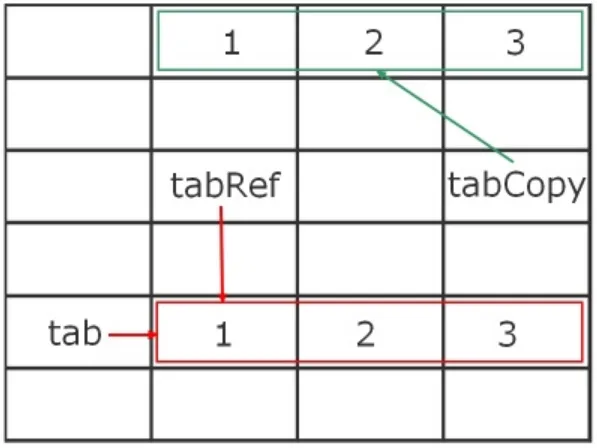
// 1) var tabCopy = tab; // 2) var tabRef = @tab;
In the first case, the array is copied: new space is allocated, each value of the array 'tab' is copied into it, and the variable 'tabCopy' points to that new space. In the second case, however, the variable 'tabRef' points to the same memory space as 'tab': if 'tab' is modified (not assigned!), 'tabRef' will be too. Here is (roughly) how memory looks for our code:
So you can "play" with '@' to manipulate arrays. When an array contains other arrays, you can get a reference to one of these inner arrays with '@':
var tab = [1, 2, [3, 4, 5]];
var secondTab = @tab[2]; debug(secondTab); // [3, 4, 5]
push(secondTab, 6); debug(tab); // [1, 2, [3, 4, 5, 6]]
push(tab[2], 7); debug(secondTab); // [3, 4, 5, 6, 7]
Note: An array cannot hold a reference to itself. Trying to do so creates a copy, with the operation cost that comes with it.
var tab = [1, 2, 3];
tab[0] = @tab; // Creates a copy
If you use references to other arrays, like 'tabRef' referencing 'tab', you must modify 'tabRef' and not reassign it, so as not to break that reference...
// Each example is independent and does not change the starting values // i.e. after each example, 'tabRef' and 'tab' go back to their default values, which are: var tab = [1, 2, 3]; var tabRef = @tab;
// 1) tabRef = []; // or tabRef = @[];
// 2) tabRef += [4];
// 3) push(tabRef, 5);
// 4) remove(tabRef, 2);
tabRef = [] and tab = [1, 2, 3]
tabRef = [1, 2, 3, 4] and tab = [1, 2, 3, 4]
tabRef = [1, 2, 3, 5] and tab = [1, 2, 3, 5]
tabRef = [1, 2] and tab = [1, 2]
Conclusion
With assignments, don't use '@' blindly No risk when the variable holds a number or a function A reference is created when the data is an array or a string This reference is broken by a reassignment; to keep it, you have to modify the object, for example with '+=' or 'push'
In this part, we will look at using '@' when returning from functions. It is very simple to use, and in most cases feedback won't bother you, since the returned variable is usually created inside the function. Consider this program:
global _global = DEFAULT_VALUE;
function getGlobal () { return /* @ ? */ _global; }
var local = /* @ ? */ getGlobal();
/* Modifying local for example: push(local, 0); or local += 1; Depending on DEFAULT_VALUE */
debug ("Local: " + local); debug ("Global: " + _global );
local = return ... local = return @ ... local = @ return ... local = @ return @ ... Value of _global Operations Feedback Operations Feedback Operations Feedback Operations Feedback 42 1 no 1 no 1 no 1 no "a string" 1 no 1 yes 1 yes 1 no function () {} 1 no 1 yes 1 yes 1 no [42, -42, 42] 82 no 1 yes 1 yes 83 no ["un autre string", -42, [42]] 109 no 1 yes 1 yes 110 no
Note: The operation cost of the assignment to local has been subtracted, to show only the cost of the return
"@ return @ ..." means that one @ is placed on the assignment and another one on the return.
As you can see, using '@' avoids useless copies; however, feedback occurs in the same cases as with assignment (arrays, strings and functions). Note also that using two '@' breaks the reference, because it creates a copy. To stay consistent, either always return with 'return @...', or remember to put an '@' when assigning a function's return value. For more flexibility, it is best not to return the reference: if the caller wants a copy, there will be two @, which adds one operation on top of the cost of the copy, and it isn't readable.
Conclusion
Once again, using '@' saves you from unnecessary copies Be careful not to put two '@': this causes a copy and adds an operation So it's a good idea to stick to a convention, in particular not returning a reference
That's it, I've covered everything about '@'. It is very popular for optimizing your code and saving precious operations. Here are its main uses, along with the techniques to adopt:
= breaks references (except when passing by reference to a function): you have to modify the object with functions (push, remove, etc.) or with operators such as +=, -=...'@' doesn't do everything: optimization is essential when building an AI, but it's a good start.
Impossible de charger les données du jeu.
Vérifiez votre connexion et réessayez.