> LeekScript Tutorial
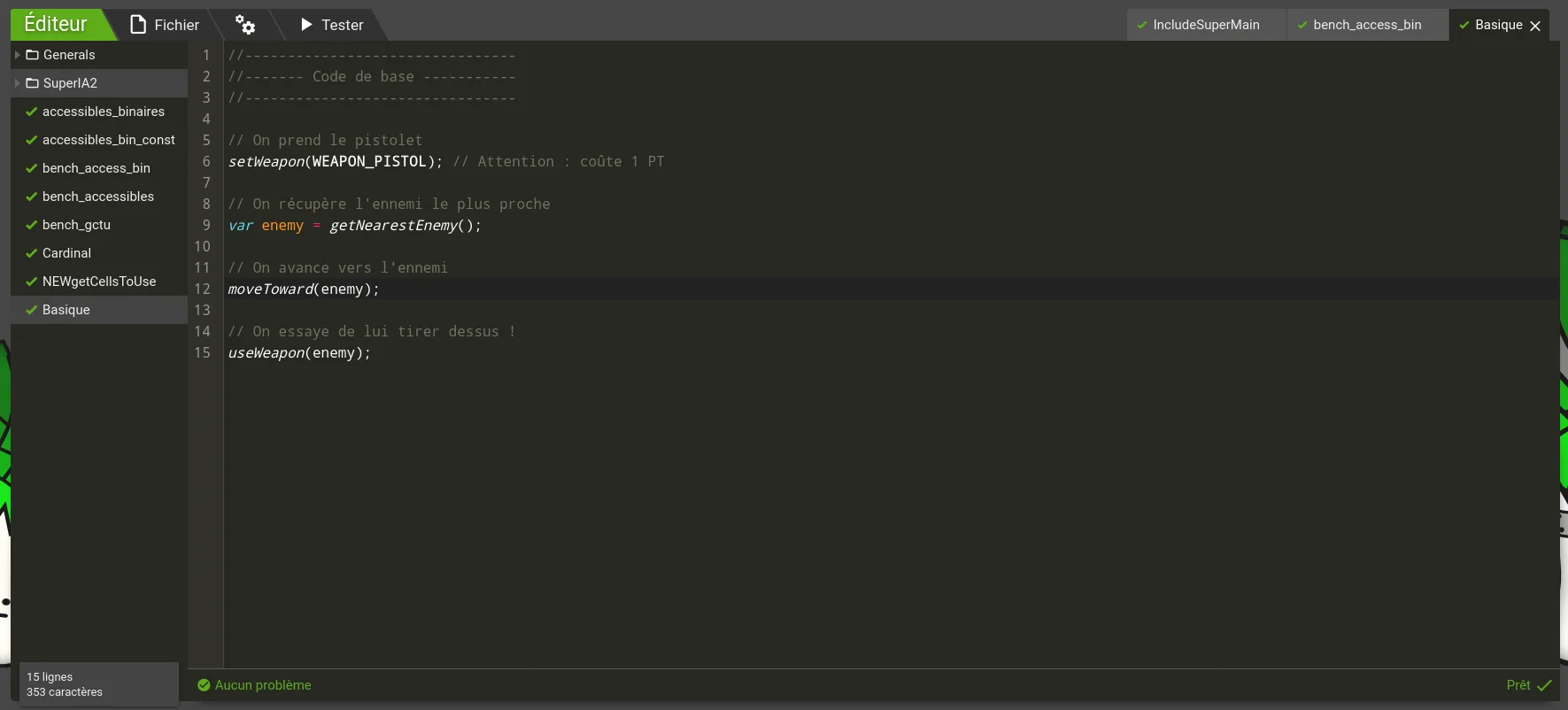
The editor is where you develop your AIs. To learn more about AIs, head over to the LeekScript Tutorial. The top bar lets you manage your AIs.
You can easily create an AI by right-clicking on the left panel. Right-clicking also lets you create a folder, into which you can drag and drop your AI files. Right-clicking an AI file opens an options menu that lets you rename or delete it.
The "File" button in the top bar opens a menu that lets you create an AI file or a folder, and also save or delete a file or a folder.
The right-hand part of the top bar shows all your open files. Click any of them to switch to it.
At the bottom of the left panel, you'll find statistics about the open AI, such as its number of lines or characters.
Finally, the bottom panel shows your errors and which line of which file they're on (Me? Make mistakes?). Click an error to jump straight to it.
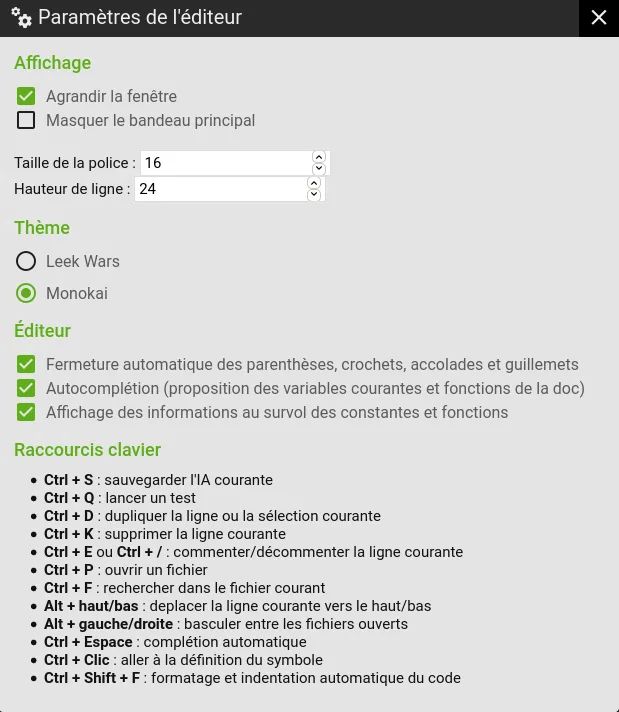
The "Editor settings" button in the top bar, shown as two gears, opens a menu where you can change how the editor looks (font size, line height, color theme) and choose your coding preferences. !Options For example, you can turn autocompletion of variables/functions on or off, as well as the automatic closing of parentheses and braces. A last block of text lists the editor's keyboard shortcuts:
The "Test" button will be one of your best friends. It gives you access to a fight generator where you can test your AI in a controlled setting. There you can choose a custom map, the leeks that will fight, and their AIs.
The "Scenarios" tab lets you create fight scenarios: which leek fights which, in what setting (solo, team, BR...) and with which AIs. Test AIs are provided by default, with 4 difficulty levels:
The "Leeks" tab lets you create and edit custom test leeks. You can set their characteristics, weapons and chips as you like.
The "Maps" tab is where you create custom test maps.
The "Seed" option under "Advanced" lets you pick a number that will be used as the seed of the fight's pseudorandom number generator. "Huh?" you say? It's very simple: everything that happens in a fight (starting positions, turn order, strength of effects...) is partly determined by a pseudorandom number generator. The seed lets you choose "which generator" will be used. In short, using the same number will give you exactly the same fight! Fantastic for testing a change in your AI or fixing bugs (Bugs? In MY AI????)
Once the fight starts, you'll watch your test fight in a fight player identical to the ones in the Garden, on a special test map.
The fight summary page has two buttons you won't find on a regular fight summary: !End-of-fight buttons
The "Back to the editor" button takes you back to where you left off in your masterpiece. The "Fight again" button starts a new test fight with exactly the same settings. If you set a seed, this new fight will be perfectly identical.
Your leek can only have one AI equipped at a time. But you can split your code to make it easier to read, thanks to the include function.
For example:
include("Movement");
This instruction includes the content of the "Movement" AI. In other words, the entire content of the included AI is copied where the include function is called.
You give include the name of the AI to include. This name must be in quotes.
Say the "Movement" AI contains:
// Move toward the enemy moveToward(getNearestEnemy());
Then, if you have a main AI that includes "Movement":
// Equip the weapon setWeapon(WEAPON_PISTOL);
include("Movement");
// Attack the enemy useWeapon(getNearestEnemy());
When the code runs, it becomes this:
// Equip the weapon setWeapon(WEAPON_PISTOL);
// Move toward the enemy moveToward(getNearestEnemy());
// Attack the enemy useWeapon(getNearestEnemy());
Make no mistake: what your code does doesn't change. The result would be exactly the same if you put all of the code in one single AI. Include simply makes things more readable and better organized once your AI gets big.
You'll spend quite a lot of time in the editor, glaring at your code. Pick a theme and font size accordingly, so your eyes don't get tired too quickly.
You're now equipped for what comes next. Time to start coding!
Impossible de charger les données du jeu.
Vérifiez votre connexion et réessayez.