> Programming
The purpose of this algorithm is to find the cells a leek can reach, starting from a given cell with a given number of MP.
In practice, it is a function that takes a cell and a number as parameters, and returns an array of cells.
If someone mentions a "getAccessibleCells" or "getReachableCells" function, or anything with a similar name, you will now know what they are talking about.
As soon as you want to plan your moves, this function becomes essential.
Knowing which cells you can reach lets you, for example, pick the cell where you will take the least potential damage, or see where you could move to deal damage to your opponent.
Among other things, this algorithm is used in the hide and seek algorithm (Hide and seek).
In itself, it is fairly simple to set up a way to get the accessible cells. The simplest method is to test the distance to every cell of the map with getPathLength.
But this function is expensive in operations. So using it on every cell of the map... your operation count would skyrocket.
A slightly smarter solution is to first find the cells within MP range, then check that they can actually be reached with getPathLength.
Both solutions work, but their cost in operations quickly becomes high.
If you are a beginner and the solution described below still seems a bit complicated, feel free to stick with these solutions at first. Early in the game, you won't necessarily have many calculations to do, and at low level you won't have many MP. So you can afford to use these solutions.
Getting your accessible cells with these methods works without any trouble.
But a first problem arises when your number of MP increases. The higher it climbs, the more cells there are to test, obviously. In the worst case, if you go through the whole map with call after call to getPathLength, you should get away with a bill of about 4 million operations, "only".
Needless to say, this greatly reduces the operations left for other algorithms such as combos, or the damage map.
And that's not all! There is another problem: you are not alone in a fight. You will almost certainly need your opponents' accessible cells as well, to protect yourself from their attacks. And if the various leeks start summoning bulbs, that makes even more cells to compute.
In short, if you set out to compute the accessible cells of this whole little crowd with these methods, it will cost you far more than an arm and a leg.
So we use another, much more efficient method: going from neighbor to neighbor!
First of all, what is a "neighbor"? The neighbors of a cell are simply the cells adjacent to it. And we obviously mean the cells that share a side with it, the ones directly next to it, not the diagonal ones.
So the cells in the corners of the map have a single neighbor. Cells on the edges have two. And all the others have four.
The first thing you need to know how to do is therefore to get the neighbors of a cell. With the functions getCellX, getCellY and getCellFromXY, you can easily find these famous neighbors.
Once you can get the neighbors of a cell, you need to determine whether that cell is "walkable". In other words, if the cell is an obstacle or a leek is standing on it, your leek won't be able to move onto it.
To find out, you will need the functions isObstacle, isEmptyCell, isEntity or getCellContent.
The principle is actually quite simple, even if it is not necessarily easy to implement for a programming beginner.
So your leek is on a cell, and it has a certain number of MP to move with. The cell it is currently on is at a distance of 0 MP; so far, so good...
If your leek has 1 MP, where can it move? Well, onto the free neighbors of its starting cell.
And if it has 2 MP? Then it can move, for 1 MP, onto the free neighbors of its starting cell. But also, for 2 MP, onto the free neighbors of the free neighbors of the starting cell.
And so on...
In green, the starting cell. In red, the cells being explored.
By going like this, from neighbor to neighbor, you get all the cells you can move to, and as a bonus, you also get the number of MP needed for each one.
But when should you stop? When you have no MP left, of course. And to know that, you just have to count backwards.
For example, if a leek has 3 MP, then by staying where it is, it still has 3 MP. By moving one cell, it has 2 MP left, and so on...
In green, the starting cell. In red, the cells being explored.
And there you go! By stopping at zero, you only get the cells you can reach with your MP.
Finally, to handle obstacles, there is only one thing left to do, if you haven't done it already. To handle obstacles, simply ignore the cells that are obstacles or that are occupied by a leek. And, of course, the edges of the map.
You should end up with an algorithm that behaves like this:
In green, the starting cell. In red, the cells being explored.
If you get this kind of result, well done: you have successfully built a superb accessible cells algorithm!
Watch out: this method is not necessarily cheaper than the one using getPathLength. If you handle it badly, it may cost you much more.
Indeed, when you explore the map by going from neighbor to neighbor, you must be careful not to go back. You need to expand your area of accessible cells without going through them again in the opposite direction.
If you didn't see it coming and you go through cells again as in the picture, the cost in operations may explode as your MP increase.
In red, the cells already visited. In orange, the cells analyzed at each iteration.
On the left, what should happen. On the right, what can happen if you "go back".
Here are a few improvements, which either reduce the number of operations of the algorithm or give results that are more convenient to use.
To use this trick, you need to know how maps work and how to use them.
Rather than storing the accessible cells, or the ones being tested, in an array the usual way, you can use them as keys in a map: that way, checking whether a cell is accessible or has already been tested no longer requires the inArray function, you simply do:
if(mapContainsKey(table, cell)) { //the cell has already been tested } else { //the cell has not been tested yet }
Since the cells are the keys of the map, you can store a piece of information for each cell, for example the number of MP needed to reach that cell.
You need to know that global variables exist, know how to put arrays inside arrays, and possibly know the getTurn function.
For a given cell, the neighboring cells that are not obstacles (leaving leeks aside) usually change very little during a fight. So there is no need to recompute them every time the function is called: just store them on turn 1 in a global variable, as a huge array that holds, for each cell, a small array containing all its non-obstacle neighbors. Then, for a given cell, you just go through this small array and check that none of these cells is occupied by a leek. You can also update the global variable at the start of each turn, to remove the neighbors occupied by leeks (and put back those that were occupied by a leek on the previous turn).
This method relies on a representation of the map that uses the properties of binary and bitwise operators: an integer is made of 64 bits, and some of these bits can store a piece of information about a given cell.
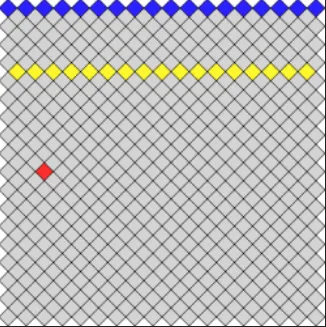
The map is split into 35 rows, and each row is associated with an integer. Bit i of this integer then stores a piece of information about the i-th cell of that row.
the cells in dark blue are those of the first row, the bright yellow ones belong to the 8th row, and the red cell is the 3rd cell of the 19th row
You then need to create two arrays following this principle:
Then initialize the algorithm by setting to 1 the bit of the starting cell, in the second array.
After that, a few bitwise operators are all you need to find every cell adjacent to the ones that are already accessible:
//here obs is the first array, telling whether a cell is empty or not //here acc is the second array, telling whether a cell is accessible or not
//case 1, N is even: acc[N] |= (acc[N-1] | acc[N+1] | (acc[N-1] >> 1) | (acc[N+1] >> 1)) & obs[N] //case 2, N is odd: acc[N] |= (acc[N-1] | acc[N+1] | (acc[N-1] Note: since integers are now stored on 64 bits instead of 32, other representations of the map than this one are possible. It's up to you to pick the one that suits you best!
Note 2: (Hard) now that BigInteger exists, you can use a single variable to represent the whole map, with a mask to get the cells of an even or odd row. Watch out for the edges!
This method uses bitwise operators, which have the advantage of costing only one operation each. So it costs far fewer operations than the others. However, it is not perfect: for example, it is harder to know how many MP are needed to move to a given cell.
Feel free to visit this Leek Wars forum topic.
There you can compare your algorithm's results with those of other players.
You will also find plenty of leads for optimizing the cost in operations of your code.
Impossible de charger les données du jeu.
Vérifiez votre connexion et réessayez.